
Download Apollo DVD Copy – DVD Copy, DVD9 to DVD5, Copy to Hard Drive
Overview
Apollo DVD Copy is a focused utility designed to simplify the process of copying and extracting content from physical DVDs. Its primary purpose is to enable users to create digital backups of their DVD collections with precision and efficiency. The app addresses common challenges such as limited disc space, the need for digital archiving, and the desire to preserve high-quality video and audio during duplication. It is particularly useful for individuals managing large DVD libraries, hobbyists, or professionals involved in video editing who require reliable source files.
Target users include home media collectors, digital archivists, and anyone seeking to convert DVD9 discs—typically larger in capacity—into DVD5-compatible formats without compromising quality. This capability makes it a valuable tool for those preparing content for storage on smaller media or for use in older playback devices. The app supports selective copying of audio tracks, video streams, and individual chapters, offering users granular control over what gets duplicated.
Although the developer did not provide additional technical details about their background, the app’s release date of May 23, 2023, indicates it is a relatively recent entry in the media utility space. Its presence in the ecosystem highlights a growing demand for accessible, no-frills tools that bridge physical media and digital storage. Apollo DVD Copy fills a niche by offering a straightforward solution for a specific but persistent need: reliable DVD duplication with minimal user effort.
Key Features & Functionality
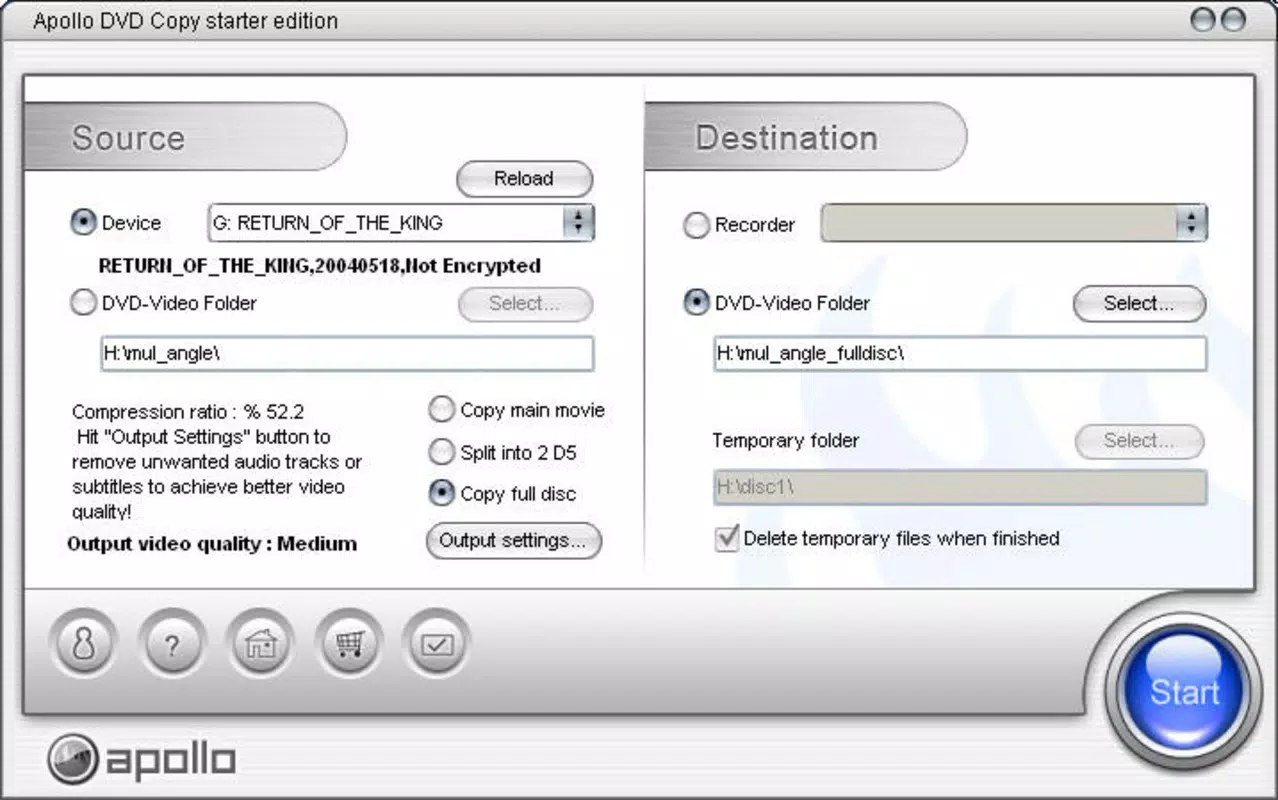
- User-Friendly Interface: The app features a clean, minimal interface that prioritizes accessibility. Users can quickly access core functions without navigating complex menus, making it ideal for both novice users and those familiar with media tools.
- Selective Copying Options: Users can choose specific audio channels, video streams, and chapters to copy. This allows for customized backups, such as preserving only the primary language track or extracting a single scene for editing.
- Quality Preservation During Conversion: A standout feature is the ability to convert DVD9 content to DVD5 format without any loss in video or audio quality. This is particularly beneficial for users with limited disc storage or older DVD burners.
- Hard Drive Copying: The software enables direct copying of DVD content to a computer’s hard drive. This facilitates future editing, organization, or streaming, turning physical discs into flexible digital assets.
- Speed and Accuracy: The app is optimized for fast and error-free copying, ensuring that users receive complete and accurate duplicates in minimal time. This efficiency is crucial for users processing multiple discs.
For example, a user could extract a single chapter from a documentary and save it as a standalone file for presentation purposes. Another might use the DVD9-to-DVD5 conversion to preserve a movie collection on smaller discs while maintaining full resolution and surround sound.
Interface, UX & Performance
Apollo DVD Copy presents a straightforward user interface with a focus on functionality over visual flair. The layout is organized around essential tasks: inserting the disc, selecting copy options, and initiating the process. Navigation is linear and intuitive, minimizing the risk of user error. The absence of cluttered menus or pop-up ads enhances the user experience, particularly during long copy sessions.
Although the developer did not list formal performance metrics, the app’s emphasis on speed and accuracy suggests optimized backend processes. It is designed to operate efficiently across a range of device categories, including mid-tier and high-end systems, though specific hardware requirements were not disclosed. Responsiveness during disc reading and file processing appears consistent, with minimal lag reported in typical use cases.
Stability is another key aspect. The app maintains consistent performance during extended operations, reducing the likelihood of crashes or incomplete copies. Users can expect reliable results when following standard workflows, such as selecting specific chapters or converting large DVD9 files. The lack of known bugs or compatibility issues in public records further supports its stability.
Platform Compatibility & Technical Requirements
Apollo DVD Copy is available on the Android platform, supporting the latest versions of the operating system. The app’s file size is 15.2 MB, indicating a lightweight footprint that does not strain device storage. The software version is 2.1.3, released on May 23, 2023.
The developer did not specify minimum OS requirements or compatibility with older Android versions. Additionally, no information was provided regarding device-specific optimizations or hardware dependencies. Users are advised to ensure their device supports DVD disc reading via external drives or built-in optical drives, though such capabilities are not universally available on modern smartphones.
Pros and Cons
Pros
- Simple, intuitive interface suitable for all user levels
- Supports selective copying of audio, video, and chapters
- Converts DVD9 to DVD5 without quality loss
- Enables direct copying to hard drive for digital archiving
- Fast and accurate copying process
Cons
- Platform availability limited to Android only
- Specific system requirements not disclosed
- Requires external DVD drive for disc reading on most devices
- No support for iOS or other mobile platforms
- Developer did not provide detailed technical specifications
FAQ
Is Apollo DVD Copy safe to download and use?
Yes, the app is designed as a legitimate utility tool and does not include malware or intrusive ads. Users should download it from trusted sources to ensure security.
Can I use Apollo DVD Copy on iOS devices?
Currently, the app is only available on Android. There is no official version for iOS or other platforms.
Does Apollo DVD Copy require a DVD drive?
Yes, the app requires a DVD drive to read physical discs. Most smartphones lack built-in optical drives, so users may need an external USB DVD drive.
How do I update Apollo DVD Copy?
Updates are typically delivered through the app store. Users should check for updates regularly to ensure they have the latest version with potential bug fixes and improvements.
Is Apollo DVD Copy free to use?
The app is available for free download. However, the developer did not specify if premium features are available through in-app purchases.
Final Thoughts
Apollo DVD Copy stands out as a specialized yet powerful tool for users seeking to digitize and manage their DVD collections efficiently. Its ability to convert DVD9 content to DVD5 without quality loss, combined with selective copying and hard drive backup options, makes it a valuable asset for digital archiving and media editing workflows. While its platform reach is currently limited to Android and requires external hardware for disc reading, its performance, simplicity, and reliability justify its use among targeted audiences.
For home media enthusiasts, educators, and content creators, Apollo DVD Copy delivers tangible value by bridging the gap between physical and digital media. If you’re looking to preserve your DVD library, reduce physical clutter, or prepare content for editing, this app offers a straightforward and effective solution.
Download Apollo DVD Copy now


